

I was three tabs deep in something else — a browser window, an email, a Slack thread, it doesn’t matter which — when the idea showed up. A good one, too. By the time I’d switched to Obsidian, found the right note, and figured out where this idea actually belonged, it wasn’t a spark anymore. It was a half-remembered fragment I typed out of obligation.
That gap — between having an idea and getting it into the vault — is where most of my best notes used to die.
Quick disclosure before I go further: I’m the developer of the app I’m about to describe. I built Lemonize, so take the enthusiasm with the grain of salt it deserves. But I’m also its first and most demanding user — the person who hits the shortcut a dozen times a day, long before I ever thought of it as something to ship.
The problem to solve with Obsidian
Obsidian is, from my perspective, the best knowledge tool I’ve used. Local files, full control, a vault that only gets more valuable with time. What it never had was a fast way in.
An idea that strikes mid-task has a shelf life of a few seconds. If getting it into your notes takes more than one action — open the app, find the folder, create the note, pick a template — you don’t lose the idea because you forgot it. You lose it because the friction outlasted it.
This isn’t a missing feature. It’s an architecture problem. The apps we keep open — the ones we actually reach for under pressure — win over the beautifully organized second brain we only visit on weekends. Presence beats richness, every time.
I could have solved this by stitching together three or four single-purpose tools — one for the hotkey, one for the floating window, one for formatting the Markdown. I’ve made that mistake before. The cost of gluing specialized tools together always ends up higher than the sum of what each one does well; you spend more time on the seams than on the work.
So please meet Lemonize.
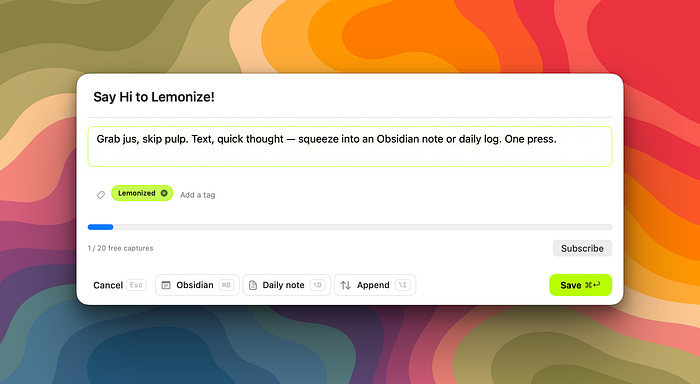
What actually happens when you press the shortcut
No menus, no window switching. A global keyboard shortcut, from anywhere on the Mac, and a small floating panel appears on top of whatever you’re doing.
If you had text selected, it’s already sitting there in the panel. If you didn’t, you get a blank capture — still one keystroke away from writing. From there:
- Adjust the text, title, or tags if you want to — you don’t have to.
- Pick where it goes: a brand-new note, today’s daily note — or a different app entirely (more on that below).
- Press enter.
The panel closes. You’re back exactly where you were, mid-sentence, mid-tab, mid-thought. The whole thing is designed to disappear before you notice you left.
 Capture a quick thought
 Thought recorded in my Daily Note
Zero permissions. Literally zero.
Here’s the part I’m most proud of, and it started as a constraint.
Most capture tools on macOS ask you to grant Accessibility access, approve automation permissions, or install a background helper before they do anything useful. Lemonize asks for nothing. No Accessibility grant, no companion process, no system dialog to click through. You install it, set your vault, and the shortcut works.
I’ll be honest about how I got there: an early version shipped with an optional helper app for reading extra context from the frontmost window. Apple’s App Review pushed back, and rather than fight it, I rebuilt the capture path to need no special access at all. The selection lands in the panel through a mechanism every Mac app already supports, inside the standard App Store sandbox, with nothing running behind your back.
What I gave up: Lemonize no longer records the window title or browser URL of where you were. What you get in exchange: an app that touches nothing on your system it didn’t strictly need. For a tool whose entire job is handling your half-formed thoughts, I’ll take that trade every time. Your captures go from your screen to your notes — and nowhere else.
Nothing to track, nothing to phone home
Zero permissions was only half of the promise. The other half: Lemonize collects nothing. No analytics, no trackers, no crash reports phoning home, no account to create, no record of what you capture or when. I have no dashboard telling me how you use the app — and I don’t want one. It’s the same privacy-first stance that drew me to Obsidian in the first place: your notes are yours, and a tool whose job is handling them has no business reading them. What you type in the panel exists in exactly two places — your screen, and the note where it lands.
Not just Obsidian, also Bear and DEVONthink

Lemonize started as an Obsidian tool, because that’s where I live. Then people who live elsewhere asked for a way in too.
The same panel now captures to three destinations:
- Obsidian — a Markdown file written directly into your vault, as a new note or appended to today’s daily note. No sync service in between.
- Bear — a new note created natively, with your tags and a template you control.
- DEVONthink — a Markdown record with native tags and an optional target group, filed quietly in the background while you keep working. DEVONthink doesn’t even come to the front unless you ask it to.
Switching is one click on the selector in the capture panel — or ⌘B to cycle through them without touching the mouse. The choice is per-capture: your default stays your default, but when one thought belongs in your research database instead of your vault, you route it there in the same breath.
One shortcut, one panel, three doors. Whichever notes app won your loyalty, the capture path is the same.
Set it once, forget it
Capture only stays fast if the panel already knows what you want. So Lemonize lets you shape everything once, in the settings, and never think about it again. The insertion format is yours to define: how a new note is structured, how an entry lands in your daily note, where the title, tags, and timestamp go. Same for the defaults — default destination, default tags, default folder in your vault. The next time the panel opens, it’s already configured to your taste; adjusting something at capture time is the exception, not the routine. A capture tool should ask you one question at most — what’s on your mind — never five.
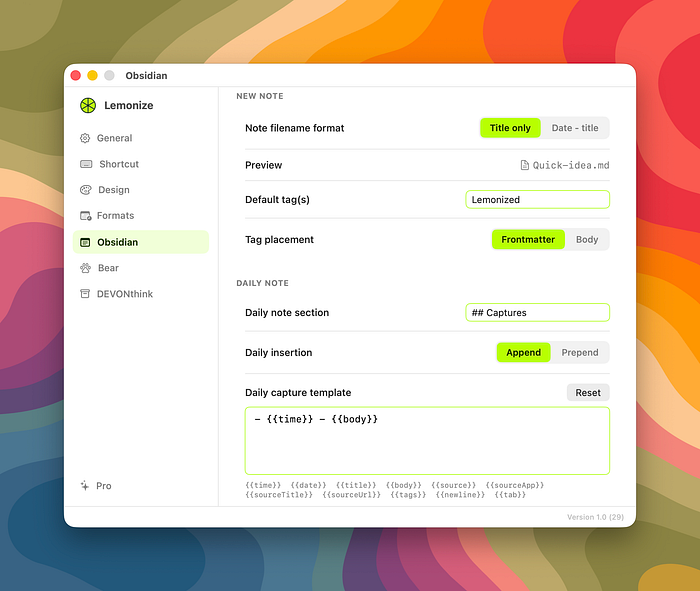
Grab jus, skip pulp
The name is a small joke that turned into a design principle:
Grab jus, skip pulp. Text, browser bits, quick thought — squeeze into an Obsidian note or daily log. One press.
A lemon has almost nothing you actually want inside it — mostly rind and pulp — until you press it, and out comes the part worth keeping. That’s the whole premise of the app: take whatever raw, half-formed thing crossed your mind, and squeeze only the usable part into your notes.
Why a lemon, though? Full disclosure: I love citrus. Lemons, oranges, grapefruits — if it has a peel and an attitude, it’s welcome in my kitchen. So when I needed a name for an app whose entire job is extracting the good part from a messy moment, the metaphor was already sitting in my fruit bowl. A raw idea is a lot like a lemon: unpromising on the outside, mostly pulp and bitterness if you bite into it whole — but press it at the right moment and you get the one thing worth keeping. Lemonize is that press. And when your workflow hands you lemons, don’t make lemonade — make notes.
Built for ownership, on purpose
Lemonize writes Markdown, to apps that respect your data. For Obsidian that means a plain file in your vault; for Bear and DEVONthink, a native note through each app’s own door. No intermediate account, no proprietary format, no server holding your notes hostage between the moment you write them and the moment they land where they belong.
That wasn’t a technical default — it’s the same conviction that got me onto Obsidian in the first place, and the same one that kept me away from Notion: I want to own what I write, in a format I can still open in thirty years.
Small on purpose
Lemonize does exactly one thing: get an idea out of your head and into your notes. No themes, no history browser, nothing else competing for attention. Adding Bear and DEVONthink didn’t change that — it’s still one panel and one keystroke; only the landing spot became yours to choose. I’d rather ship something narrow that works every time than something broad that works most of the time.
That restraint runs both ways. Capturing everything isn’t the goal either — every note saved is a small future obligation, to tag it, revisit it, decide if it still matters. Making capture effortless doesn’t mean you should stop being selective about what’s worth keeping. Lemonize removes the friction of getting an idea in. It doesn’t remove your judgment about whether it belonged there.
Priced like a coffee
Two ways in, depending on how you work. If capture is an occasional thing for you, there’s a subscription at €1.99 a month — it’s like buying me a coffee, and you can stop whenever the app stops earning its place. If you already know this belongs in your daily workflow, a one-time purchase at €7.99 gets you Lemonize for good, future updates included. Pay once, or pay small — either way you get the whole app. No tiers, no “pro” unlock holding the useful parts hostage.
Who this is actually for
Lemonize is built for a Mac user who has already committed to a real notes system — an Obsidian vault, a Bear library, a DEVONthink database — and who needed the last missing piece: a way to feed it without ever leaving what they were doing. If your notes live in a browser tab or a proprietary silo, there’s nothing here for you yet.
The tool I use every day
I’ve kept very few tools for years — most things get replaced, cancelled, or quietly abandoned. Lemonize is the newest addition to that short list, and it earned its place the same way the others did: by disappearing into the workflow instead of asking for attention.
The capture feature your notes app was missing. Any idea, from any app, straight into Obsidian, Bear, or DEVONthink — with zero permissions and without ever breaking your flow. That’s it. That’s the whole pitch.
You can see it at suliworld.com/getlemonize. Or download it on the Mac Appstore
Where do your best ideas usually die — the switch to the app, or the decision about where they go?