

Last April, when I explained why I replaced WordPress with Hugo, I wrote that publishing from Obsidian required “no export step.”
I was wrong. Or more precisely: I was paying the export step in small, invisible installments. Stripping wikilinks by hand. Deleting my private notes section before every publish. Fixing image paths. Rewriting YAML frontmatter as TOML. None of these took more than a minute — which is exactly why I tolerated them for months.
Then one evening I published an article with a [[wikilink]] still sitting in the middle of a paragraph, rendered as raw brackets for the whole world to see. That was the push I needed. I did what developers do when a manual task starts itching: I built a plugin. It’s called HugoBridge, and it takes a note from my vault to a publishable Hugo page bundle in one explicit command.
The lie I told myself in April
Here’s the thing nobody tells you when you connect a knowledge vault to a static site generator: they both speak Markdown, but they speak different dialects of Markdown.
My vault is full of Obsidian-isms. Wikilinks like [[Previous article|the previous article]] that only mean something inside the vault. Image embeds pointing at an attachments folder Hugo has never heard of. A ## Sources PKM section at the bottom of every draft — my private working notes, listing the permanent notes that fed the article. Frontmatter in YAML, when Hugo wants TOML.
Hugo, on its side, wants a page bundle: a folder named YYYY/MM/slug, an index.md, the images sitting next to it, a featured cover image, clean relative references.
Between the two, there was me. Copying, adapting, renaming, deleting — every single time. Each step trivial, the sum error-prone. The day my private sources section almost shipped with an article, I understood that “no export step” had quietly become “I am the export step.”
One source of truth, two separate worlds
Before writing a line of code, I made one design decision, and everything else follows from it: the vault and the Hugo repository stay separate, and the Obsidian note is the single source of truth.
The generated bundle is just output. Regenerable, disposable output. I never edit index.md in the Hugo repo — if something needs to change, I change the note and export again. There’s no sync in the other direction, no file watcher, no background magic. My notes live where all my thinking lives, in plain Markdown files I’ll still be able to open in thirty years, and the blog receives a translated copy when — and only when — I ask for it.
This is the same conviction that runs through everything I’ve built around my vault: plain text as the source, tools as replaceable translators around it. Obsidian holds the writing. Hugo renders it. HugoBridge is the border crossing between the two.
How an export actually works
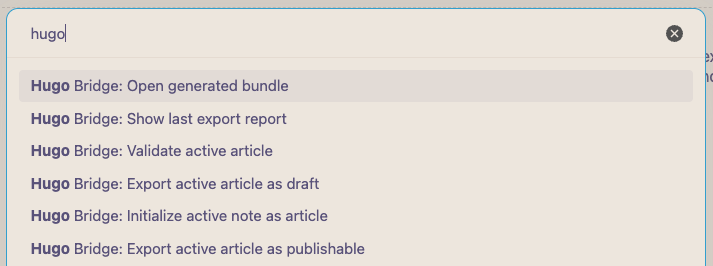
A note becomes an article through a small editorial lifecycle, tracked in its frontmatter: idea, draft, review, ready. One command initializes a note as an article — it generates a stable ID, proposes a slug from the title, stamps the date, and touches nothing that already exists. From there, the note carries everything Hugo will need: title, description, categories, tags, a cover image.
When I export, the plugin doesn’t write a single file right away. It builds a plan first:
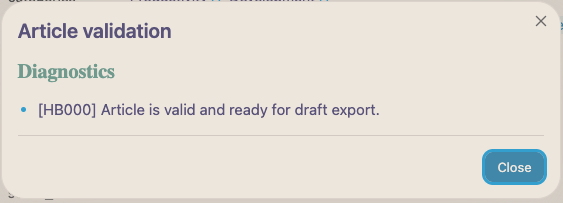
- It validates the metadata — missing description, malformed slug, bad date? The export stops with a precise diagnostic.
- It converts wikilinks into real Hugo URLs, by looking up each target note’s own slug and date. My internal links between articles resolve themselves.
- It inventories every image, copies them into the bundle, and renames the cover to
featured.png(or whatever the extension is). - It strips the trailing
## Sources PKMsection — my private notes never leave the vault, structurally, not by discipline. - It generates the TOML frontmatter, with
draft = truefor a preview export ordraft = falsefor a publishable one — the latter only if the note’s status isready.
Then it shows me the plan: which folder, which operation — create, update, or nothing changed — which files it will write, which transformations it applied. I confirm, and only then does it write, each file atomically, index.md last.
Change the status, run the command, review the plan, confirm. That’s the entire publishing workflow now.
The plugin never guesses
The part of HugoBridge I care most about isn’t a feature. It’s a refusal.
A wikilink pointing at a note that isn’t a published article? The plugin doesn’t invent a URL — it blocks the export and tells me why. A target folder that already contains an article it didn’t generate? It refuses to touch it: every bundle it writes carries a marker and the note’s ID, and it will only ever update files it can prove it owns. An export where nothing changed? It writes nothing at all — re-exporting the same note twice is a no-op, not a re-upload.
Let me be clear: I could have made all of this “smarter.” Guess the URLs, overwrite whatever sits at the target path, skip the confirmation modal. It would demo better. But this tool writes into the canonical version of my blog — the thing readers actually see — and a tool that writes into canonical territory has to ask before it acts. I’d rather fix a blocked export in ten seconds than discover a silently broken link in production three weeks later.
Strict validation is a feature. Explicit confirmation is a feature. Refusing to guess is the feature.
Small on purpose
HugoBridge doesn’t commit to Git. It doesn’t push, doesn’t deploy, doesn’t publish to Medium, doesn’t post to social networks, and doesn’t send a single byte over the Internet. It exports the active note to a local folder, and that’s where it stops.
That’s not a roadmap gap — it’s the same restraint I applied to Lemonize: a tool that does exactly one thing earns its place; a tool that does five things adequately gets replaced. Everything downstream of the export already has an owner anyway — GitHub Actions deploys the site the moment I push. HugoBridge ends precisely where that pipeline begins.
What I gained
Publishing an article is now: set status: ready, run one command, read the plan, confirm. Done.
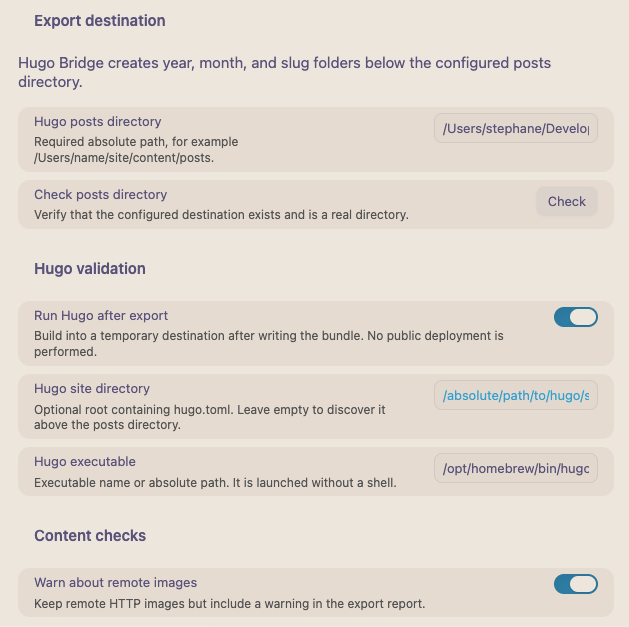
No copy-pasting between folders. No wikilink ever ships as raw brackets again — it either becomes a working URL or it stops the export. No image path to fix, no YAML-to-TOML conversion in my head, and my private sources section is physically incapable of reaching the blog. As a last safety net, the plugin can even run Hugo itself against the exported content, in a temporary folder, and tell me whether the site still builds.
But the real gain is subtler than the saved minutes. My vault stays a pure Obsidian vault — wikilinks everywhere, private notes at the bottom of drafts, zero compromises for the sake of publishing. And my blog stays a pure Hugo site — clean bundles, valid TOML, no trace of where the content came from. Neither side bends to accommodate the other anymore. The bridge absorbs the incompatibility so that neither world has to.
Build the translator
Two years ago I chose Obsidian for my thinking. Last year I chose Hugo for my publishing. Both choices were right, and they didn’t quite fit together — the seam between them was made of my time and my attention.
Lemonize was me building the missing door into my vault. HugoBridge is the missing door out of it. I’m starting to think this is what owning your tools actually means — not writing everything from scratch, but noticing the seams where your attention leaks, and closing them with something small, strict, and yours.
When two tools you love speak different dialects, don’t replace either one. Build the translator.
HugoBridge is on GitHub, as-is. I built it for myself — wired to my own vault conventions, my own frontmatter, my own Hugo setup, and it only runs on macOS. No packaging, no support, no roadmap beyond what I personally need next. If reading the code saves you from building your own bridge, that’s a bonus, not the point.
What’s the manual step you keep paying in your own workflow — the one small enough that you’ve never bothered to kill it?